How To Start Live Coding

Hey, it's Ray.
This post is about getting started with Live Coding.
How To Use This Tutorial
Here's a video that will give you a taste of what this tutorial includes and how to use the interactive elements:
What is Live Coding?
Live Coding is the art of coding to interact with a program in realtime.
It's often used to create sounds and images, and in our case, it's most often used to create music.
Now, if a picture is worth a thousand words, then a video must be worth at least a million words...
So here's a few videos to show what I've done with Live Coding (you can also check out my other Songs):
There's No Time
Getting Started
I see these questions a lot when people first discover Live Coding:
-
How to get started with live coding?
-
How to learn live coding as a beginner?
-
What is the best way to learn live coding as a beginner?
The usual answer is:
Check out the docs
While that's great stuff, I wanted to create my own tutorial in case it's helpful. There's also a few things I want to mention that most tutorials won't mention.
Let's begin.
Firstly, there's the elephant in the room:
Do I need to know music to Live Code?
That's a tricky question. You can Live Code without knowing music but this topic is probably worthy of its own post so I won't dive into it here.
Moving on...
Actually Getting Started
The next question would be:
What tool should I use?
Learning music tools is like relearning coding (again, a topic worthy of its own post). It can be easy or tricky but depends on what you want to do.
I suggest starting with Strudel as it seems the simplest and modern way to get started. Even building it is quite simple. In fact, if you're serious about Live Coding, you really should build and run it.
There's a lot of benefits to this. For instance, it's an achievement that most people will never try. You'll also be able to run the app offline so you can use it even if the website or the entire internet is down (alarmily, this becoming increasingly frequent in the 2020s).
To make things easier, I've done a full tutorial on installing Strudel in my Install Strudel post (give that a read, then continue on with this tutorial).
In comparison, I tried TidalCycles and it took me a few minutes of debugging to get it running (there's a lot more involved and the downloads have changed since I last worked with Haskell).
TidalCycles has a cleaner functional syntax. However, if you're a beginner, it might not be the best option as it's a bit more involved (e.g., editor, synths, etc.).
Making Music
Now that you're all setup, your first question is probably:
How do I get started Live Coding?
So let's start with making some music.
First, I have a couple of posts that'll show you how to make a bass. This is a good place to get started as you'll learn about the app and how to make music with it:
- Beginner:
- Intermediate: Making a Techno Bass in Strudel
- Advanced: Custom Functions with GSB
You will have made something musical after going through at least one of those.
You'll also be able to tell whether you like this style of making music and whether Live Coding is for you.
If you like this. Great. If you don't... also great.
Live Coding isn't everyone's cup of tea, and there's no shame in that. In fact, that's the natural order of reality. Different people like different things.
Now, you can stop here or continue on. The choice is yours.
A Short History
If you're still here, awesome.
Let's continue.
So, Strudel is essentially a web port of TidalCycles, which is a terse patterning language over Haskell and SuperCollider (there's a long history and community around this).
And like other Live Coding environments, it takes a language (JavaScript in this case) and adds it's own syntax on top.
If Haskell is more your thing, you should check out TidalCycles (I haven't done any tutorials on this yet). If you don't like JavaScript, you're unlikely to like Strudel but there's plenty of other environments to try.
What You'll Make
If you're still here, I'm guessing you're a fan of JavaScript. Good for you.
So you'll be re-creating a short piece of called The Livecoder, which I created for this tutorial.
You can see it in action below:
Making Sounds
Now, let's learn how to use Strudel.
Firstly, to Live Code, you need to make sounds.
In Strudel, that looks like this (you might have to click play to see the code):
setcpm(120/4)
$:sound("bd!2 sd - hh")._punchcard()
That's a Live Code Snippet. This post features a lot of them so you can see the code in action.
You can click the Play button to play that snippet. It will play a sequence of bass drum twice (bd!2), snare drum (sd), rest (-), and hi-hat (hh) at 120 BPM. It will also visualize the sounds (_punchcard()).
You can configure the sounds like this:
setcpm(120/4)
$:sound("<[bd!2] [sd,hh] <- hh>>*4")
Which plays bd twice on the first beat of the measure, the sd and hh together on the second beat, and alternates - and hh on the third beat. The entire pattern is repeated (and sped up) fours times per measure.
A Full Beat
Here's a full drum beat:
setcpm(120/4)
$:sound("[bd sd]*2,hh*8").bank("tr909")
Playing Notes
Sounds are great for drum beats but when you think of music, you probably think of melodies. You'll need notes to play those.
That looks like this:
setcpm(120/4)
$:note("<<c1!4 [c2 c3]!2>>*4").s("supersaw").lp(1000).trans(12)
Which plays C Major octaves with a supersaw bass that varies between dark and bright pitches.
If that melody sounded familiar, good spot! That means you've noticed it's a variation of the bass melody from my Making a Techno Bass in Strudel post.
Now, like coding, there's many ways to do the same thing. There isn't necessarily a right way to do things. However, this tutorial focuses on the basics, although you can always choose to do things differently.
Let's bring back the drums:
setcpm(120/4)
$:stack(
  sound("[bd sd]*2,hh*8").bank("tr909"),
  note("<<c1!4 [c2 c3]!2>>*4").s("supersaw").lp(1000).trans(12)
)
And add in a piano:
setcpm(120/4)
$:stack(
  sound("[bd sd]*2,hh*8").bank("tr909"),
  note("<<c1!4 [c2 c3]!2>>*4").s("supersaw").lp(1000).trans(12),
  note("<<c2!3 c3 [c2 g2] [c3 a3]>>*4").s("piano").trans(24).jux(rev())
)
That plays a semi-random melody that alternates (jux). You'll notice it uses the same concepts as with the drums and bass.
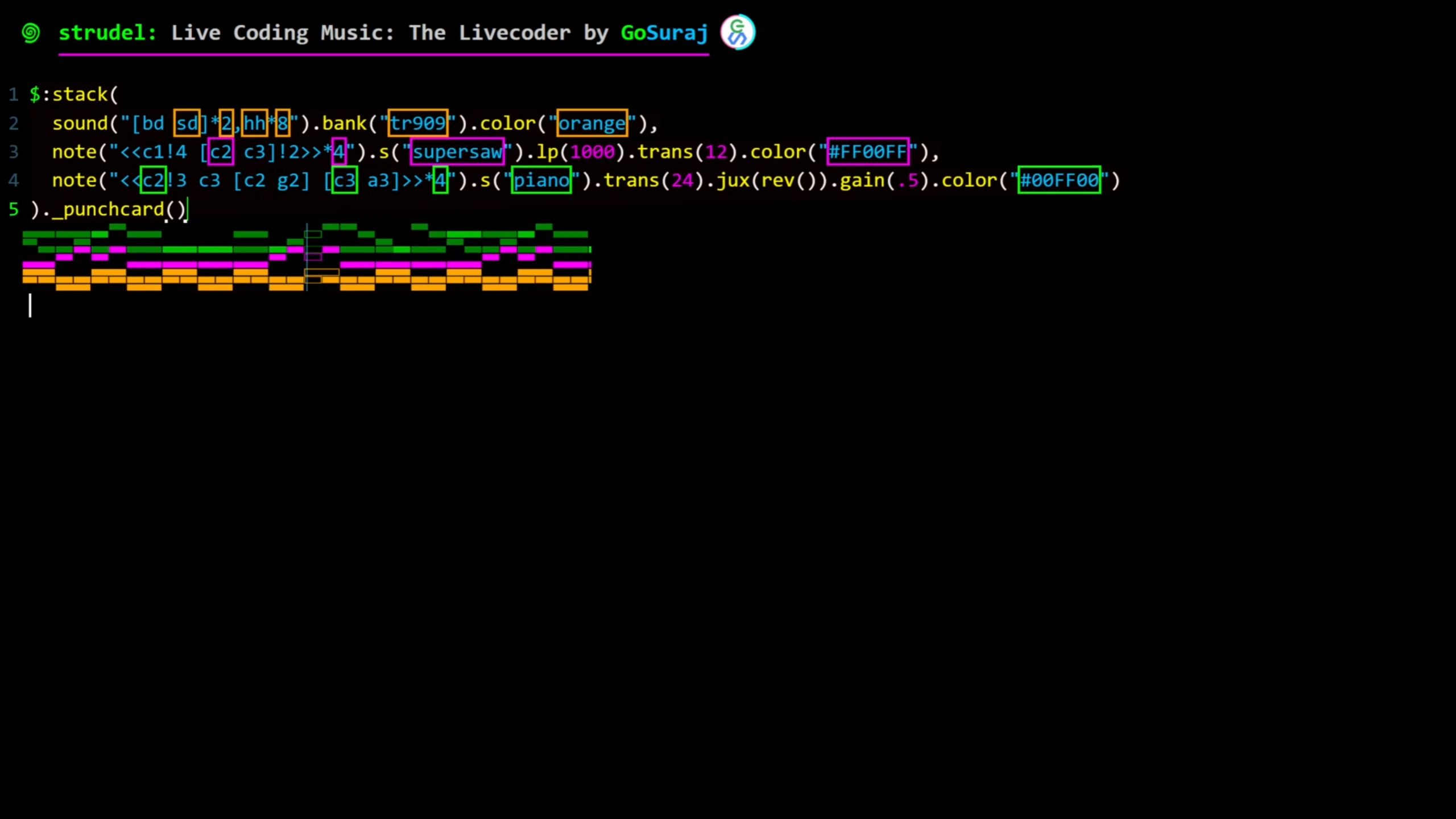
It's a bit noisy, let's adjust volumes (gain) and visualize it:
setcpm(120/4)
$:stack(
  sound("[bd sd]*2,hh*8").bank("tr909").color("orange"),
  note("<<c1!4 [c2 c3]!2>>*4").s("supersaw").lp(1000).trans(12).color("#FF00FF"),
  note("<<c2!3 c3 [c2 g2] [c3 a3]>>*4").s("piano").trans(24).jux(rev()).gain(.5).color("#00FF00")
)._punchcard()
That's Live Coding
That's it.
At this point, you're Live Coding.
Like most things in music, there's a lot to it and it can get quite complex.
Although, also like most things in music, Live Coding is just another way to create music.
Other Tools
Of course, each tool has its own pros and cons.
For instance, Live Coding is a fun and quick way to interact with music. It's great for artists looking for a different way to make music, or for coders looking to express themselves with music. However, it can be difficult to structure and create a full song in Live Coding compared to the musical powerhouse that is the DAW.
But with great power, comes great responsibility, as it's easy to get overwhelmed with the myriad of endlessly extensible functionality.
There's also a tendency for perfectionism (again, a topic worthy of its own post). With full control over every aspect, it's almost too easy to get lost in configurations. Add in the pressure to produce a full song, combined with the increased time and effort, would intimidate most folks. For instance, it took longer to create this more structured cover piece:
And that's excluding the rendering and editing of the video with nedge VFX.
You can even go beyond making music and make sounds. You can get a taste of that in my Ray vs. Side-chaining post. And in case, you're in the mood for a video check out the Era of Aria:
All the sounds you hear in that video are from 20+ instruments that were designed for the song.
I always find it fascinating how complex making music can get...
And it often results in strange experiments like when I thought the Strudel piano sounded nice so I turned it into a MIDI instrument to play Undertale: MEGALOVANIA.
However, so long as you're enjoying it, then it's all good fun.
What Next?
Now you can go and make more music!
If you found this tutorial useful, great. And do checkout my other videos and posts, you might find something you like. If you didn't find this tutorial useful, let me know via the Contact page. Your feedback helps me improve the content for everyone.
In case you're looking for more content, you can checkout my other Posts or these links: